Color & Palettes for Pixel Art Lesson 3 of 4
Hue-shifting and temperature
Shift shadows cooler and highlights warmer — the pro-color upgrade.
When you make a color darker for shadow, do not just lower its brightness — that looks flat and muddy. Shift the hue too: push shadows toward cooler hues (blue, purple) and highlights toward warmer hues (yellow, orange). This mimics how real light works and is the single biggest upgrade from amateur to professional color.
- Shadow = darker + hue rotated toward blue/purple (cooler)
- Highlight = lighter + hue rotated toward yellow/orange (warmer)
- The more hue rotation, the more vibrant (and stylised) the result
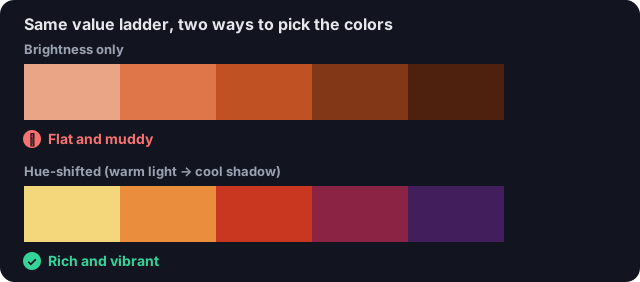
Brightness-only (top) stays muddy; rotating hue warmer for light and cooler for shadow (bottom) is the upgrade.
Your turn
Shade this ball with a hue-shifted ramp.
The highlight is warm (pink), the base is red, and the shadow shifts cooler (purple). Place each where the guide shows to pass.
Match 85% to pass · now at 0%
Colors
Quick check
To make a shadow color rich instead of muddy, you should: