Pixel Art for Games Lesson 2 of 6
Clean lines and shapes
Beat the jaggies: consistent stair-steps, no doubles, no orphan pixels.
A diagonal line in pixel art is really a staircase. It reads as smooth only when the steps are consistent — for example, two pixels across, then down one, then two across again. When the step lengths jump around (1, then 3, then 1), the eye sees a jagged, broken edge. Pixel artists call these bad spots "jaggies."
The three most common line mistakes
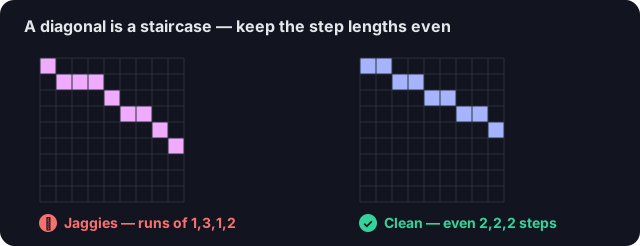
Uneven step lengths (left) read as jaggies; even, gradually-changing runs (right) read smooth.
- Jaggies — uneven step lengths that break an otherwise smooth curve
- Doubles — two stacked pixels that thicken a 1px line and interrupt its flow
- Orphan pixels — a lone pixel poking off a shape with nothing connecting it
- Block in the shape roughly first — do not chase clean lines yet
- Walk the outline and even out the stair-steps so each run is a consistent length
- Remove any doubled pixels along a 1px line
- Delete or reattach orphan pixels so every pixel is part of a shape
Quick check
A curved outline looks jagged and broken. What is the most likely cause?